



 Parental Control
 WhatsApp Tracker
 LINE Tracker
 Phone Surroundings
 GPS Phone Location
 Geofencing App
 Hidden Call Recorder
 Keylogger for Android
 Lock App


ClevGuard Support: Monitor Devices with Others' Permission.
In a digital age where every child has a smartphone, parents face unprecedented upbringing challenges. When children spend hours glued to WhatsApp, Snapchat, or Instagram, or lock themselves in their rooms scrolling through their phones, you might secretly worry: Are they being cyberbullied? Are they making dangerous friends online? Did they click on a phishing link?
Modern parents are busier than ever, making it nearly impossible to sit down every day and scroll through mountains of chat logs and photos. To solve this digital parenting headache, the renowned parental control software KidsGuard Pro has rolled out an epic update for its Android parent end—fully integrating the OpenClaw core technology. With this cutting-edge AI application, parents no longer need to look for a needle in a haystack. The AI directly highlights the key points, providing all-around protection for your child's online safety.
Meet the New Brain of KidsGuard Pro: What is OpenClaw?
For parents without a tech background, you might wonder: "What can an AI agent actually do for me?"
Simply put, the OpenClaw AI agent acts like a 24/7 dedicated digital butler built right into KidsGuard Pro. Traditional monitoring software only fetches data, dumping raw messages and call logs in front of you. In contrast, the new version powered by OpenClaw possesses the ability to read, understand, and analyze.
It securely reviews data from the monitored device (your child's phone) in the background and organizes the cluttered information. By simply opening the KidsGuard Pro app on your Android phone, you can leverage the OpenClaw AI agent to get a quick overview of your child's digital life, saving you time from reading line by line while allowing you to step in precisely when help is needed.

KidsGuard Pro — Feature Highlights
Instant summaries of WhatsApp / Snapchat chats
Query your child's activities using natural language
Auto-detect phishing texts and suspicious photos
Support for teen slang, acronyms, and internet shorthand
How to Use the AI Agent in KidsGuard Pro with One Click?
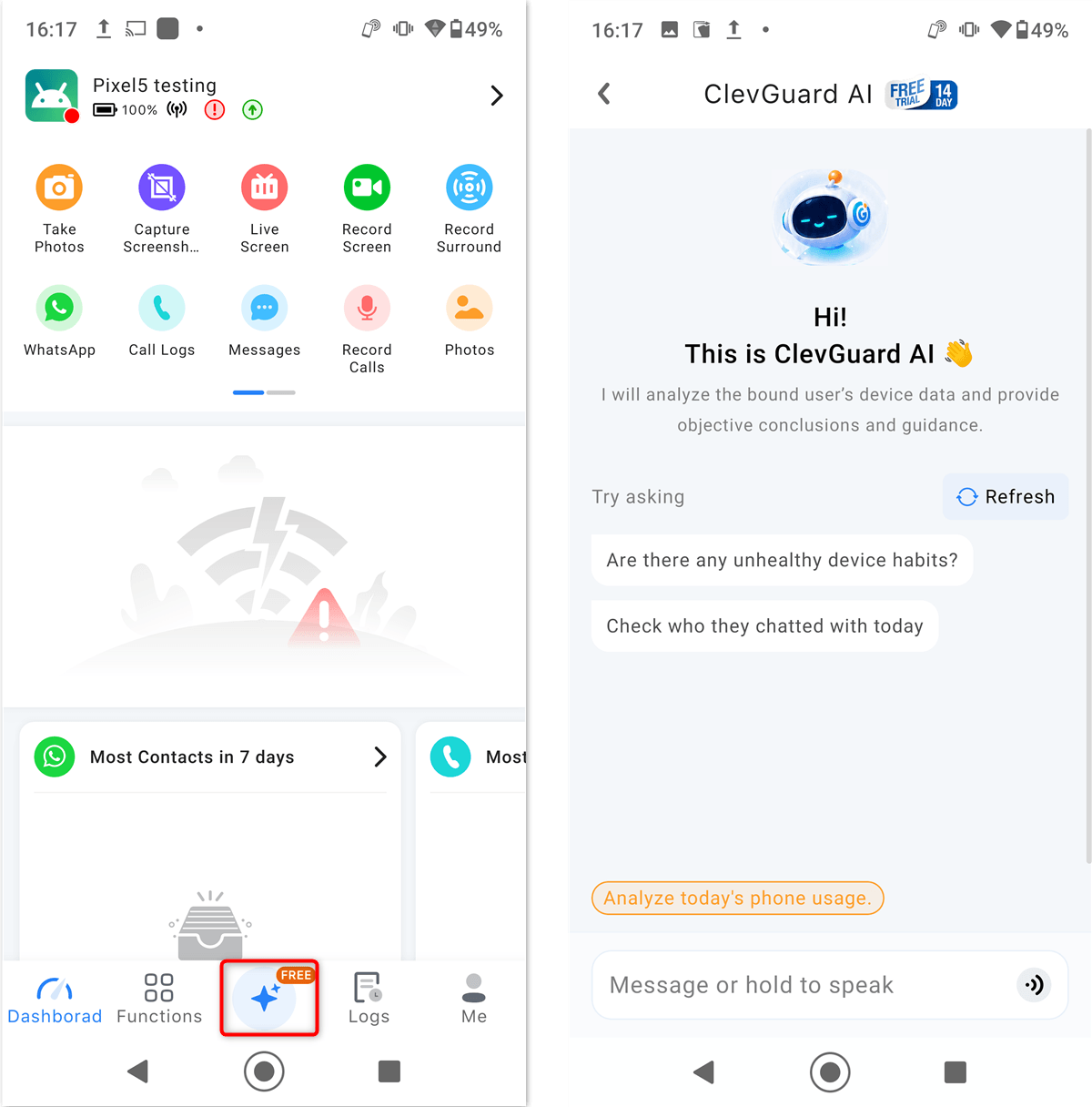
Open KidsGuard Pro on your Android device, tap the button indicated in the image, and you can start chatting with the AI agent immediately!
Deep Dive into the 4 Core Features of OpenClaw AI Agent
This KidsGuard Pro upgrade is not just a technological leap; it is entirely driven by user experience, aiming directly at parents' biggest pain points. Here are the four highly anticipated highlights of OpenClaw:
Feature 1. Social App (WhatsApp/Snapchat) Message "Key Points" Summarization
Teens love chatting on platforms like WhatsApp, Snapchat, and Instagram. Their conversations are often flooded with stickers, endless casual banter, and fragmented text phrases.
Now, the OpenClaw AI agent can automatically extract the core essence of these chats. Instead of scrolling past hundreds of emojis, the AI generates a quick summary, such as: "Today's Summary: Child discussed movie locations for the weekend with Classmate A, and talked about a video game strategy with Online Friend B." This allows parents to grasp their child's social dynamics in just three seconds.
Feature 2. Intuitive "Smart Q&A": Ask the AI Directly
This feature represents OpenClaw's biggest technical breakthrough. Parents no longer need to manually configure complex filters. Instead, you can talk to the AI naturally, just like using ChatGPT.
For instance, if you notice your child has been acting distant or stressed lately, you can type directly into the interface: "Who has my child been talking to most frequently lately?"
The AI will swiftly analyze recent communication frequencies and reply: "Over the past week, your child interacted most frequently with 'Alex' and 'Ben' via WhatsApp, with most messages sent after 11 PM." This assistant-like interaction significantly lowers the technical barrier for parents.
Feature 3. Device Photo Library & SMS (Messages) Anomaly Detection
Beyond social media apps, built-in SMS text messages and the photo library are also critical frontiers for safety. With phishing texts and online scams on the rise, the OpenClaw AI agent automatically scans incoming texts and flags suspicious URLs or scam keywords instantly in the summary report.
The scanning process of OpenClaw AI agent utilizes end-to-end encryption. Analysis results are exclusively visible to you through the parental account and will never be shared with third parties.
Feature 4. Accurate Semantic Recognition of Teen Slang & Shorthand
For AI, the hardest part is understanding slang. OpenClaw has undergone deep contextual training to accurately recognize modern youth language. Whether it is internet abbreviations (e.g., FRFR, BRB, SMH), gaming jargon, or specific subculture acronyms, the AI interprets the true meaning behind the words, preventing false alarms while ensuring actual red flags are never missed.
Why Can Parents Trust OpenClaw?
Military-Grade Data Encryption, Zero Leaks: The analysis performed by the OpenClaw AI agent is completely based on end-to-end encryption (E2EE). The AI summary reports and raw data are only accessible to you. KidsGuard Pro officially guarantees that your data will never be provided or sold to any third-party platforms.
Seamless UI/UX Design: The interface of the KidsGuard Pro Android parent app is highly intuitive. Even parents or grandparents who aren't tech-savvy can easily locate the AI assistant section, making the latest AI safety tech completely accessible with zero learning curve.
Backed by a Professional Cybersecurity Team: Combining years of expertise in the parental control industry with top-tier AI tech, KidsGuard Pro delivers more than just software—it provides a thoroughly tested, stable, and highly authoritative digital safety net.
Real-World Examples: How Parents Can Leverage OpenClaw
| Parental Concern | Sample Prompt for OpenClaw | Expected AI Output (Summary & Insights) |
|---|---|---|
| Social Circle | "List the top 3 people my child chatted with the most over the last 3 days." | Compiles the most frequent contacts on WhatsApp/Snapchat, showing total chat duration or message ratios. |
| Mood & Cyberbullying | "Have there been any arguments, cyberbullying, or swear words in recent chats?" | Filters out aggressive keywords, highlights the source (which group or contact), and summarizes the cause of conflict. |
| Screen Time & Sleep | "Which apps is my child using late at night, and what are they talking about?" | Analyzes late-night active apps and provides a one-sentence summary of the main topics discussed (e.g., homework, gaming). |
| Financial Scams | "Has anyone asked my child for money, gift cards, or credentials on WhatsApp or SMS this week?" | Accurately captures sensitive terms like "wire money," "buy gift cards," or "password" to help parents intercept scams early. |
Conclusion: Ease Digital Parenting Anxiety with AI—Try KidsGuard Pro Today
Technological advancement shouldn't widen the generation gap; it should be a shield that protects our children. The newly integrated OpenClaw AI agent on the KidsGuard Pro Android parent end completely transforms traditional passive monitoring into an interactive experience. Parents can now manage their children's online safety in the most efficient and intelligent way possible.
Are you still staying up late checking your child's messages manually? Head over to CleverGuard to learn more details about KidsGuard Pro. Download the Android version today and let OpenClaw be your dedicated digital co-parent, building a secure shield for your child's online world!

KidsGuard Pro for Android
Your Ultimate Android Monitoring App


